The Existential Choreography Planner
- Custom canvas
- Express
- MongoDB
The idea
Chores are boring and productivity apps are dull. The Existential Choreography Planner is a deliberately over-the-top answer: you turn a day's tasks into a dramatic flowchart, a "choreography", and then actually perform it. Tasks have timers, difficulty and energy costs. Finishing them well earns XP, levels, streaks and badges, and finishing them badly costs you.
It was a team university project built on the MERN stack. My part was mostly the frontend, so this case study follows that side: a flowchart editor with no diagramming library, and a runner that turns a drawn graph into a timed, scored session.
A canvas built from scratch
The planner's core is a canvas where tasks are nodes and dependencies are edges, with start, end, task and decision nodes. The frontend's dependencies are only React, React Router, Axios and a toast library, so the canvas does not use a flowchart package. Panning, zooming, dragging and connecting are all implemented directly.
- Coordinates. The canvas keeps a viewport with an offset and a zoom level. Pointer positions are converted into canvas space by subtracting the container's position and the viewport offset, then dividing by zoom. Dragging a node stores the offset between the pointer and the node, so it does not jump when picked up.
- Connecting nodes. Dragging from a node's output handle draws a line, and on release the editor hit-tests with
elementFromPointto find an input handle underneath. It then rejects self-connections and duplicate edges before creating one. - Decision nodes. A decision node is drawn as a diamond and can have several outgoing edges, each with a label that becomes a choice during a run.
Time-aware validation
Tasks can be pinned to a clock time, such as a 10:00 meeting, which creates a constraint the graph has to respect. Pure utility functions, free of any React code, handle it. Times are stored as HH:mm strings and parsed to minutes since midnight.
When two pinned tasks are connected, the editor checks that the first one's scheduled end is no later than the second one's scheduled start. If not, the connection is refused with a message naming both tasks and their times, for example that one finishes after the other starts. Keeping this logic out of the components made it easy to reason about and reuse.
The flow runner
Pressing run turns the drawn graph into a session. The runner is a hook that acts as a state machine, with the states idle, running, paused and completed, and it walks the graph from the start node.
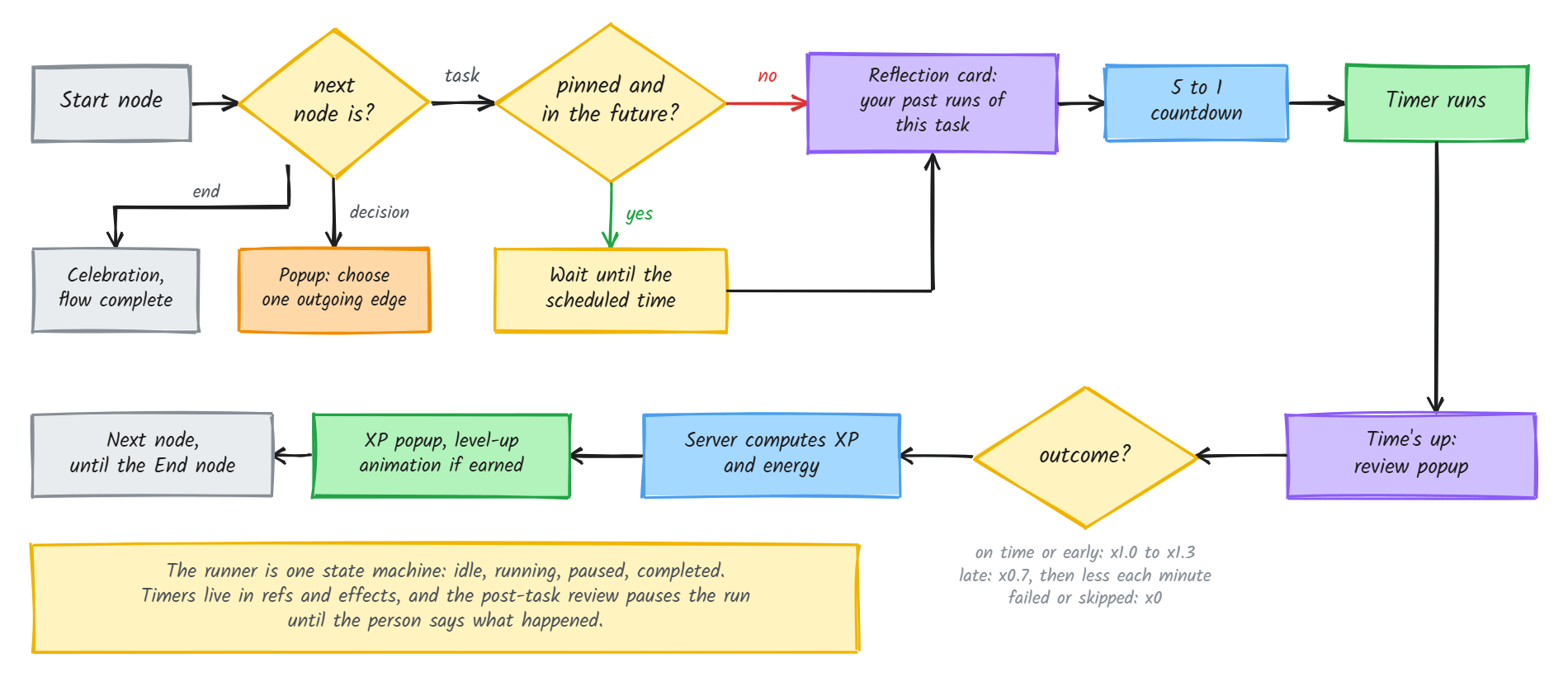
- Branching. At a decision node the runner stops and shows a popup built from that node's outgoing edges. At the end node, or a dead end, it completes and plays a celebration.
- Pinned tasks. If a task is pinned to a future time, the runner waits with a live countdown to that moment. If the time has already passed, it starts immediately and flags the task as late, and browser notifications announce what is coming up.
- A preparation beat. Before a timer starts, a reflection card shows the person's past runs of that task, and a 5 to 1 countdown gives a moment to settle. Only then does the timer begin.
- A schedule that adapts. The runner builds a timeline from the graph. Without pinned tasks it stacks tasks from the current time. With a mix of pinned and flexible tasks, it places the pinned ones at their times and fits the flexible ones into the gaps.
- Review instead of auto-advance. When a timer ends, the run pauses on a post-task review asking what happened: finished, finished late, or did not finish, with an optional reason and note. That answer decides the outcome. Because several timers and intervals share the run, they are kept in refs and cleaned up in effects, so a task's countdown cannot leak into the next one.
A focus overlay adds themed modes for a running task, each with its own colours and curated quotes, plus ambient audio.
Turning behaviour into XP
The scoring system is written as a design document first and then as code, with pure functions that have no database access and are easy to test. Every earned point comes from a single formula.
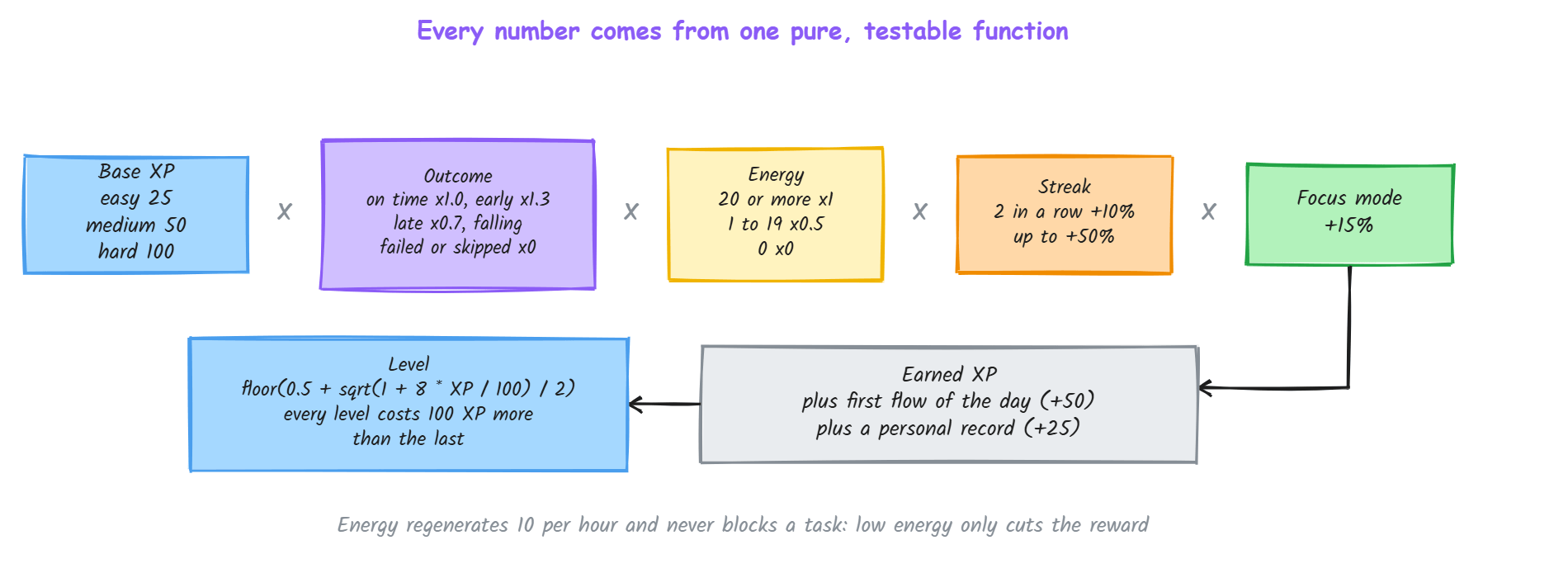
- Outcome decides the reward. Finishing on time earns the base XP, finishing with at least 20 percent of the time left earns 30 percent more, and finishing late earns 70 percent, falling by 2 percent per extra minute with a floor. Failing or skipping earns nothing.
- Energy paces the day. Energy regenerates 10 per hour and is spent as tasks complete. It never blocks the person from working. Running low only halves the XP and an empty bar earns none, a deliberate choice to reduce rewards instead of locking the app.
- Streaks reward momentum. Consecutive on-time tasks within a run add a growing bonus, and a late, failed or skipped task breaks the streak, with feedback in the toolbar.
- Levels grow gradually. Each level costs 100 XP more than the last, from a closed-form formula with its inverse for the progress bar, and levels unlock titles from Seedling to Legendary.
- Achievements. A set of 23 achievements across milestones, streaks, performance, flow mastery and special events is evaluated when tasks and flows complete.
Around the editor
- Sharing and moderation. A flow can be exported to JSON, imported again, or submitted to a public gallery. An admin reviews pending submissions before they are approved, and approved flows can be cloned by others with their progress reset and the source's clone count incremented.
- Sessions and leaderboard. An account area keeps past sessions, and a leaderboard ranks users.
- Accounts. Email and password sign-in with access and refresh tokens in HttpOnly cookies, Google sign-in through Passport, password reset by email, and an admin dashboard for users and roles.
Architecture
The backend is Node and Express with MongoDB through Mongoose, laid out as routes, controllers, services and repositories so each layer has one job. Image uploads go to Cloudinary, and the whole stack runs under Docker Compose. The frontend is React with Vite, with service modules for each API area and context providers for authentication and popups.
Limits
It is a university prototype with a big scope. The runner follows the first outgoing edge for linear flows and only branches at decision nodes, and the canvas is purpose-built for this app, not a general diagramming tool.