mini-pdf
- Go
- pdfcpu
- Bubbletea
The question behind it
Compressing a folder of PDFs is a job made of independent pieces, so it should speed up when you add workers. But how much, and does the order you hand out the work matter? mini-pdf is a small Go command-line tool built to answer that with numbers instead of guesses. It runs the same job twice, once sequentially and once on a worker pool, and reports the storage saved and the speedup side by side.
The compression itself is delegated to pdfcpu's optimizer. The project is about everything around it: how the work is scheduled, how results get back to a live terminal interface, and how the two runs are compared.
A bounded worker pool
The obvious concurrent version starts one goroutine per file. With hundreds of PDFs that means hundreds of heavy, memory-hungry compressions competing at once, which can exhaust memory and slow everything down through thrashing.
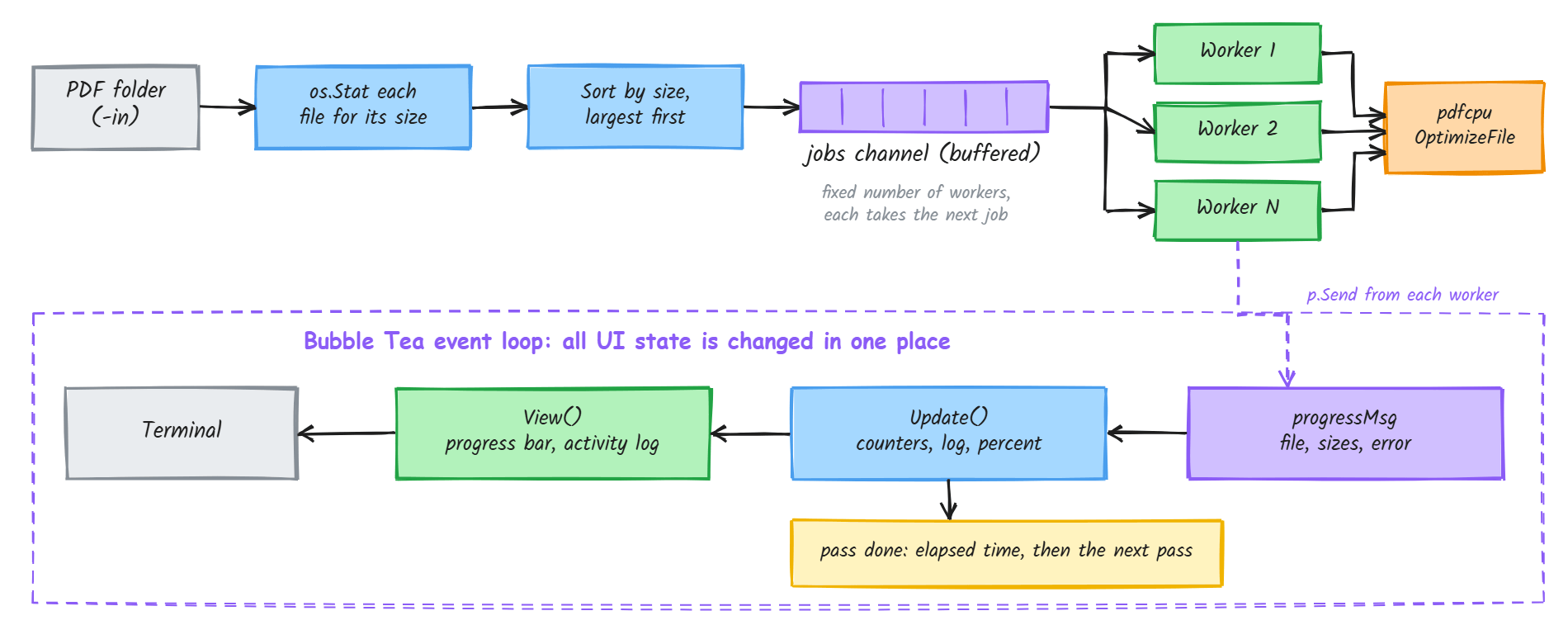
Instead, a fixed number of workers, five by default and settable with a flag, all read from one shared jobs channel. A worker that finishes a file immediately takes the next one, so the pool stays busy without any central scheduler deciding who gets what. The channel is buffered to hold every job, so the producer can enqueue everything without waiting on a worker, then close the channel. Each worker exits when the channel is drained, and a wait group lets the pass finish once the last worker returns.
Scheduling: biggest jobs first
With a pool, the order of the queue matters more than it first appears. If a large file is taken last, one worker is stuck on it while the others sit idle, and the whole pass waits.
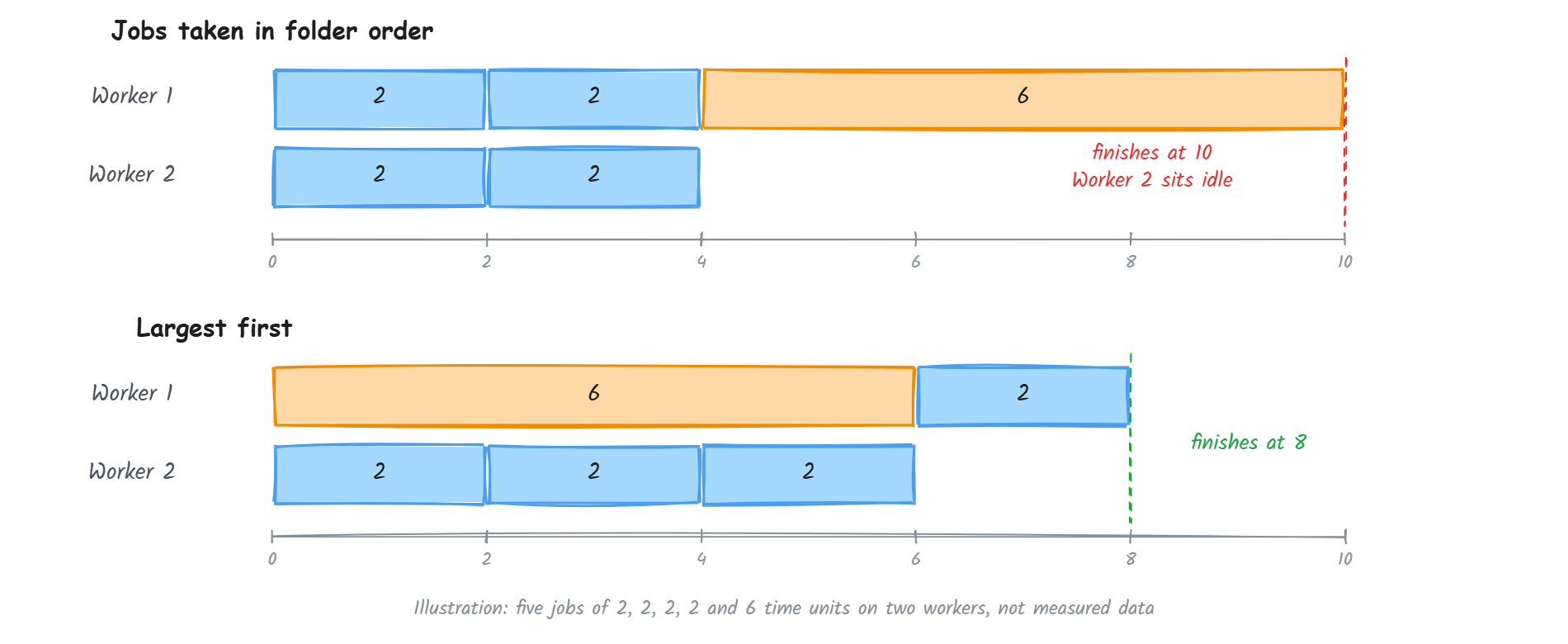
Before queuing, the tool reads each file's size with os.Stat and sorts the list in descending order. This is the classic longest-processing-time-first heuristic for minimising total completion time on identical workers. File size stands in for how long a job will take, which is cheap to know up front. It is a proxy, since real compression time also depends on what is inside the PDF, but it is a good enough one to keep a large file from becoming the tail of the run.
Keeping the interface honest
A live progress bar, spinner and activity log are easy to get wrong when work happens on many goroutines. The interface is built on Bubble Tea, which follows the Elm architecture: all state lives in one model, and it changes only in a single Update function that handles one message at a time.
Workers never touch that state. When a file finishes, a worker sends a small progressMsg carrying the file name, the original and compressed sizes, and any error, and the event loop folds it into the counters, the log and the progress percentage. Because only the event loop mutates state, there are no mutexes around the counters and no data races to reason about, and the interface keeps rendering while compression runs.
The same message-driven style runs the whole session. A pass is started by one message, runs inside a command, and ends with a passDoneMsg that carries its elapsed time. Handling that message decides what comes next: in the default mode, the sequential pass finishes, then the concurrent pass starts, then the program finishes. Each pass is timed from start to finish, and the ratio of the two durations becomes the reported speedup.
What the numbers show
At the end the tool prints the original and compressed sizes with the space saved as a percentage, the time of each pass, the time saved, and the speedup multiplier. Sizes come from os.Stat on the input and output files, and time from time.Since. The time summary only appears when the concurrent pass was actually faster, so it never reports a negative result as a win.
Known rough edges
These are the limits worth knowing about.
- The comparison is not perfectly fair. The two passes run back to back on the same files, so the second one benefits from the operating system's file cache having been warmed by the first. A stricter benchmark would repeat runs or clear the cache between passes.
- A failed file skews the savings. A file that fails to compress is logged in red and still counts toward progress, but its compressed size is recorded as zero, which makes the total space saved look larger than it is. The fix is to leave failed files out of the totals.
- File size is only a proxy for duration. A small PDF full of complex images can take longer than a large one that is mostly text, so largest-first is a heuristic, not an optimum.
- Both passes write to the same output folder. In the default mode the concurrent run overwrites the sequential run's files, which is harmless for the results but worth knowing.
Stack
Go, with pdfcpu as the compression engine and Bubble Tea, Bubbles and Lip Gloss for the terminal interface. The command takes -in, -out, -workers and -mode flags, where the mode can be sequential, concurrent or both.